The big idea: A need is what a person is trying to do or feel, written as a verb, and keeping it separate from your solutions is what lets your team find a better answer than its first idea.
In 60 seconds
- A need is what a person is trying to do or feel, written as a verb. A solution is only one way to meet it.
- Move from observation to interpretation to insight to need. Latent needs hide in workarounds, contradictions and strong emotions.
- Ask why to unmask a solution in disguise, then park solution ideas for Ideate instead of writing them into your needs.
Do this: write at least three need statements, each with a specific user, a verb and an insight from your fieldwork, for Interpret/Define.
How need-finding works
A need is what a person is trying to do or feel. A solution is one way to meet it. Teams that mix the two end up designing the first idea they had instead of what people need.
A need
- Is a verb. “Feel sure she is taking the right pills,” “know whether there is time to eat.”
- Belongs to the user. It exists whether or not your team ever shows up.
- Has many answers. You can picture several very different ways to meet it.
A solution in disguise
- Is a noun. “An app,” “more cashiers,” “a better training video.”
- Belongs to the designer. It is your idea, not their experience.
- Has one answer. It closes the door on every other option before you brainstorm.
From what you saw to what they need
Observation
What you saw or heard, as a fact.
Example: her daughter photographs every page of the discharge packet.
Interpretation
Your best guess about why.
Example: the family does not trust they will remember the instructions.
Insight
The surprising truth that explains it.
Example: instructions were given once, while the patient was in pain and distracted.
Need
What the person is trying to do, as a verb.
Example: feel sure she is taking the right pills at the right time.
Explicit needs
What people tell you directly. Useful, but everyone else hears these too.
Watch out: people often describe a solution they have seen, not the need.
Latent needs
Needs people do not say, or do not know they have. You find them in workarounds, contradictions and strong emotions.
Watch out: you must observe, not just ask.
The “ah-ha” signal
You can explain a contradiction or why people do something odd. You can predict what they will say next. You want to tell everyone.
Watch out: if nothing surprised you, dig again.
The “ah-ha” signals are adapted from the Need Finding Tools crib sheet in your course materials (Stanford Software Design Experiences, 2007).
Need-finding tools from the crib sheetPick the tool that fits what you need to learn
The crib sheet sorts need-finding into two families: observations and interviews. Here are the variations, in plain words.
| Tool | Use it when you want to… |
|---|---|
| Deep hanging out | Spend unhurried time where users are and notice what is normal to them. |
| Walk in their shoes | Feel the experience yourself by doing the task. |
| Insider tour | Have someone who knows the place show you how it really works. |
| Lead user interview | Hear from the most passionate users, who often show where things are heading. |
| Expert interview | Get up to speed fast on a field you do not know. |
| Camera study | See a day through the user’s eyes, with photos they take (with permission). |
| History interview | Walk through a sequence of events from the start. |
| Process mapping | Map every step of an experience from the user’s side and spot where it breaks. |
| Laddering (5 Whys) | Get past the first answer to the reason underneath. |
| Cultural context interview | Understand someone’s values, hopes and fears, once trust is built. |
| Intercept | Ask one or two quick questions on the spot. |
| Survey | Check how common an insight is after you have found it. |
What makes need-finding workThe principles behind every good tool
- Good subjects and settings. Interesting, open people, in their real environment.
- A plan you are willing to leave. Have goals, but chase surprises.
- Stories, quotes and images. They bring the need to life for your team and your audience.
- Look without presupposing. Trust that the real problem will appear as you go.
- Watch for the observer effect. People act differently when watched (the Hawthorne effect). Blend in and give it time.
- Leave room for silence and show respect. If you listen, people talk.
Where latent needs hideFive clues to look for in your notes
Workarounds
Sticky notes on a machine, a photo of a form, a friend holding a table. Each one marks a need the system does not meet.
Say versus do
They say training was fine, but they ask a coworker every hour.
Strong emotion
A laugh, a sigh, a raised voice. Ask what is behind it.
Odd uses of objects
Things used for jobs they were not made for (an AEIOU Objects clue).
Extreme users
People at the edge feel the need loudest, so it is easier to see.
Ladder up from a solution to the needUse “why” to unmask a solution
For example, at a small manufacturer, a supervisor says new hires “need a better training video.”
- Why would a better video help? “So they stop asking the same questions.”
- Why do they ask the same questions? “They forget what they saw on day one.”
- Why does that matter at night? “There is no supervisor after 6 p.m.”
- Why don’t they ask each other? “They told us asking twice makes them look like they can’t do the job.”
The need: a night-shift operator needs to get answers in the moment without looking incompetent. A video is one answer. A buddy, a question board or a call line are others.
Try it: Need Statement Builder
Tool · IB 407
Need Statement Builder
Turn fieldwork into a need: a specific user, a verb, and the insight behind it.
- 1Fill in
- 2Check
- 3Share
Your need statement
All checks
Put it to work: need statements for Interpret/Define
Need statements are the heart of the Interpret/Define grade (40 points). The rubric is direct: top teams reframe the challenge around a user with needs stated as verbs, and teams that state needs as nouns score lower. Write several, for different users.
From Post-its to need statements in five steps
Download and cluster
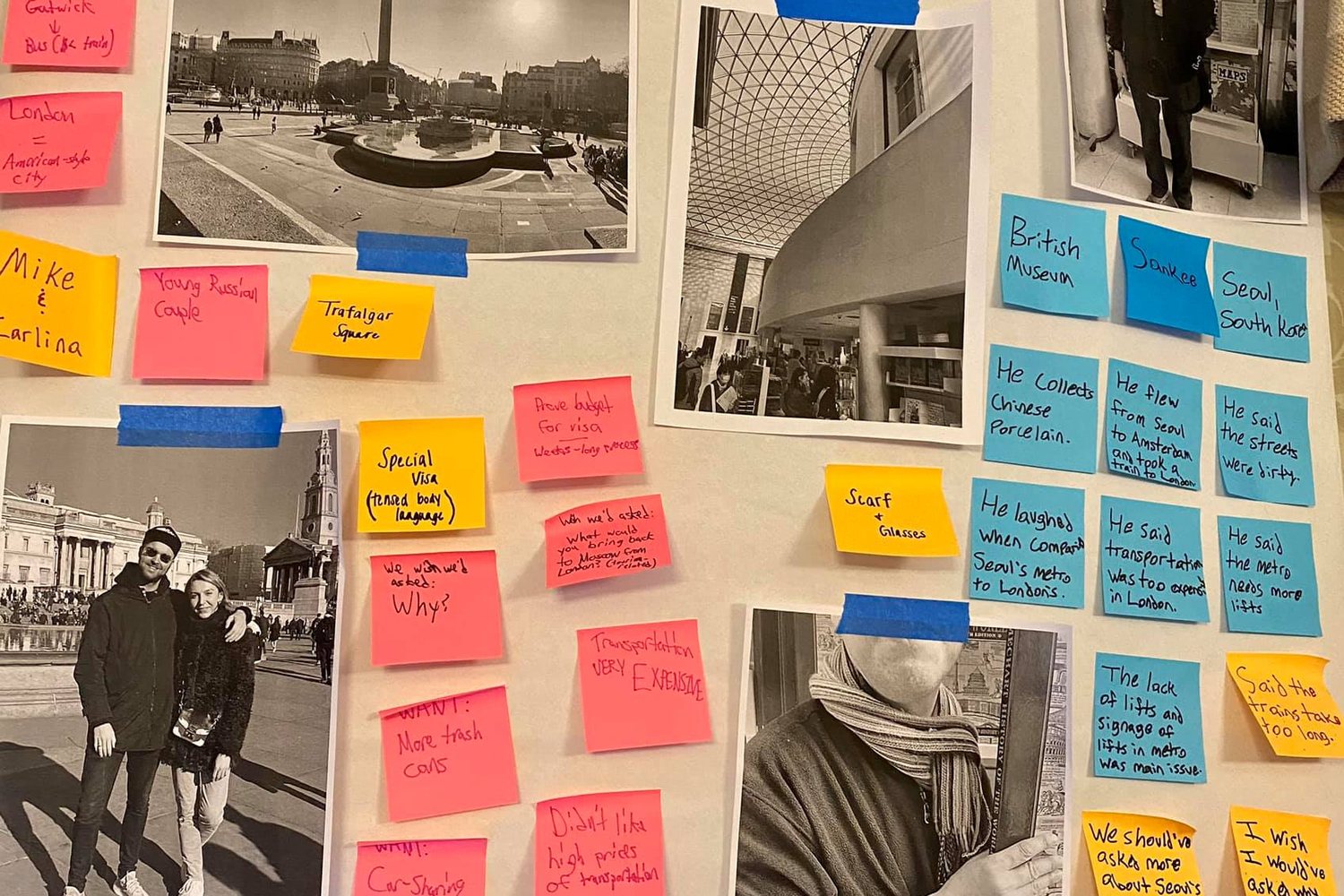
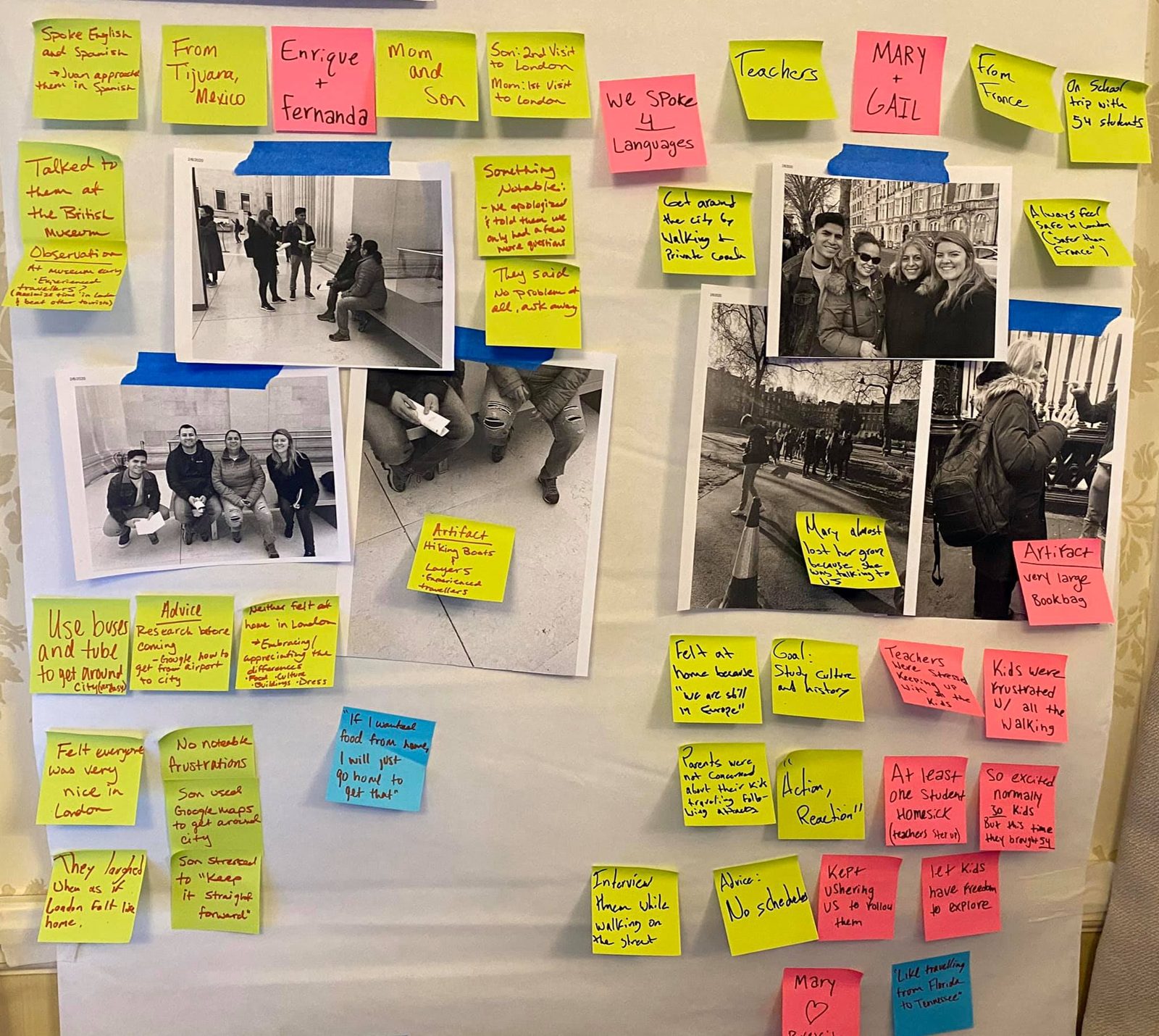
Put every quote and observation on its own Post-it. Move the most compelling ones to a new board and group them until themes appear.
Your deliverable: a photo of your theme board with each cluster named.
Write an insight for each theme
Ask what surprised you and why it happens. One sentence per theme.
Your deliverable: three to five insight statements under your themes.
Write need statements
Use the builder: a specific user, a verb, and the insight. Write one for each type of user you met, including an extreme.
Your deliverable: at least three need statements that pass every check.
Park the solutions
Every time a solution sneaks into a need, write it on a separate “parking lot” sheet. You will want it in Ideate.
Your deliverable: a parking lot list of early ideas, kept out of your needs.
Choose and reframe
Pick the need that is most surprising and most important to the user. Turn it into How Might We questions.
Your deliverable: your point of view and HMW set for the Interpret/Define submission.
Before you submitCheck your need statements
- [ ] Each need statement names a specific user.
- [ ] Each need starts with a verb and contains no product, app or program.
- [ ] Each insight comes from something we saw or heard in the field.
- [ ] We have need statements for at least three different users, including an extreme.
- [ ] We can list three very different solutions for our chosen need.
- [ ] Our solution ideas are parked for Ideate.
Go deeper
Back to all IB 407 topics · Next: Synthesis: From Stories to Insights
In-class team activity · 25 min
Unmask the Solution
By the end: Three solutions your team has been calling needs, unmasked; two need statements that pass every check; and proof that your version beats an AI draft. Your instructor will give you the password in class.
Part of the Smith GLS human-centered leadership sequence: IB 407, BUAD 317 and BUAD 497, toward the Human Centered Consulting Certificate.
Frequently asked questions
What is need-finding in design thinking?
Need-finding is the work of discovering what people are trying to do or feel, then keeping those needs separate from solutions. A need is written as a verb, belongs to the user and has many possible answers. A solution in disguise is a noun, like "an app," belongs to the designer and closes the door on other options before brainstorming starts.
What is the difference between a need and a solution?
A need is what a person is trying to do or feel, such as "feel sure she is taking the right pills at the right time." A solution is one way to meet it, such as an app, more cashiers or a better training video. Teams that mix the two end up designing their first idea instead of what people need.
What are latent needs?
Latent needs are needs people do not say, or do not know they have. You find them by observing, not just asking. Look for five clues in your notes: workarounds, gaps between what people say and do, strong emotion, odd uses of objects, and extreme users who feel the need loudest. Explicit needs, by contrast, are what people tell you directly.
How do you write a need statement?
A need statement names a specific user, a need written as a verb and the insight behind it. For example: a 78-year-old going home alone after hip surgery needs to feel sure she is taking the right pills at the right time, because the instructions were explained once, while she was in pain and distracted. It contains no product, app or program.
How do you turn a solution back into a need?
Ladder up from the solution by asking why. When a supervisor says new hires "need a better training video," keep asking why until you reach the real need: a night-shift operator needs to get answers in the moment without looking incompetent. A video is one answer to that need. A buddy, a question board or a call line are others.